Product
Autonomous agents that operate within your business context
Managed Agents™ lets you define your own specialist agents, connect them to your business systems, and set the policies they follow. The platform orchestrates every conversation, enforces your governance, and scales across every channel.
Managed agents
What managed agents means for your business
Your agents
Every agent on the platform is defined by you. You describe what each agent handles, you choose which systems it connects to, and you set the policies it operates within. The agents represent your operational knowledge and your commercial strategy.
Managed execution
The platform handles the orchestration of every agent execution, the policy enforcement before every action, the validation of every reply, and the delivery across every channel. You manage the agents and the platform manages the runtime.
Your systems
Your business systems stay where they are and your MCP servers run on your own infrastructure. The platform connects to them through Model Context Protocol but never owns or replicates your data.
The four R's
How the platform orchestrates every conversation
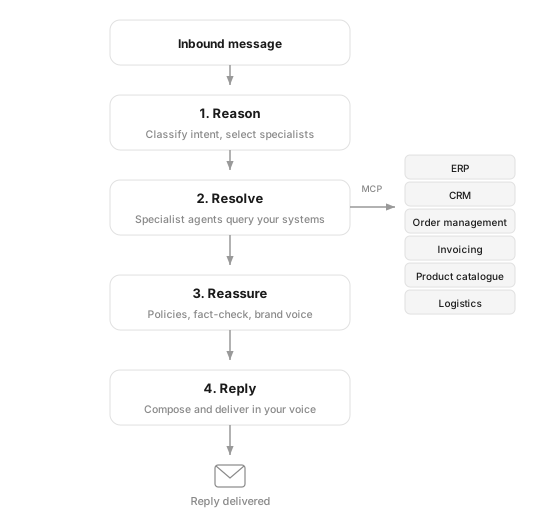
Every conversation your agents handle follows the same governed methodology. The orchestrator manages the full lifecycle from the moment a message arrives to the moment a validated reply is delivered.
Reason
The orchestrator reads the inbound message, identifies the customer from your CRM, and classifies what they are asking about. It determines which specialist agents are needed and which systems they must query to resolve the conversation.
Resolve
The orchestrator dispatches your specialist agents to your business systems through MCP. Each agent queries the specific system that holds the answer -- your ERP, your order management, your invoicing, your product catalogue. When a query spans more than one system, multiple agents work in parallel.
Reassure
Before any response is sent, the platform validates every factual claim against the source data retrieved from your systems, checks compliance with your company policies, and evaluates the tone against your brand guidelines. If validation fails, the reply is rewritten with specific feedback. When verification cannot be completed after three attempts, a team member takes over and completes the conversation.
Reply
Only after validation passes does the platform deliver the response. The reply is composed in your brand's voice and language, using your workspace settings for tone, regional preferences, and email signature. It is delivered through the same channel the customer used to reach you.
Youdefinetheagentsandconnectthesystems.
Theplatformrunseverythinginbetween.
Connections and agents
Every specialist agent connects to your business systems through the open standard
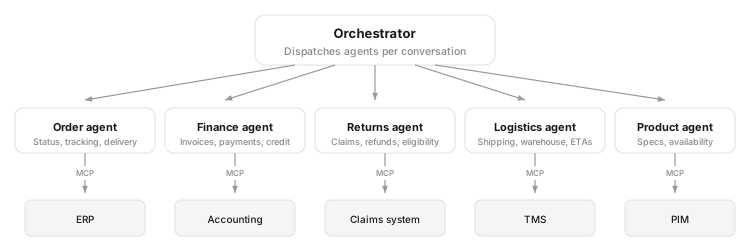
Every specialist agent you deploy connects to your business systems through Model Context Protocol. The MCP servers run on your infrastructure alongside your systems, wherever those systems are. The platform manages the connection, the orchestration, and the governance without introducing a proprietary integration layer or a vendor dependency.
Deploy an agent
From connected system to deployed agent in minutes
The platform includes system agents for knowledge base, policies, bookings, CRM, and calendar out of the box. When you need agents for your own business systems, deploying them takes three steps and no custom integration work.
Add your system to the MCP Hub
The MCP Hub is where you manage every connection between the platform and your business systems. You add a connection from the marketplace or provide the URL of a custom MCP server. Once connected, the platform shows every tool the system exposes, the number of available tools, and the connection status. The screenshot shows three connected systems -- Account Management, Order Management, and Product Catalog -- each active and exposing their tools to the platform.
Assign tools to your agents
Inside each connection, you see the individual tools your system exposes -- for example, get_order, search_orders, get_delivery_status, and cancel_order in an order management system. Each tool has a description and a dropdown where you assign it to the specialist agent that should use it. One connection can serve multiple agents and you control exactly which agent has access to which capability. You can also add agent-specific instructions that apply when the connection is active and test the connection at any time.
Configure the specialist agent
Each agent has a display name, a description that the orchestrator reads to determine when to dispatch it, a model selection, and a system prompt. The description is the dispatch signal -- when a customer query matches what this agent handles, the orchestrator sends the query to it. In the screenshot, the Order Status Agent is configured to resolve order lookups, status checks, and shipment tracking using Claude Opus 4.6. Once saved, the orchestrator starts dispatching matching queries to this agent immediately.
Theplatformgrowseverytimeyouconnect
anewsystemanddeployanagentforit.
Policies and governance
Every action the platform takes is governed by your business policies
Autonomous communication requires governance. The platform enforces your business policies deterministically at every stage of every conversation. Policies are rules enforced by code that the AI cannot override.
Tool call enforcement
Before any specialist agent calls any tool on any connected system, the policy enforcement engine evaluates your guardrails. You configure which tools require approval, which are blocked entirely, and which have their output redacted. Each guardrail can include a condition so enforcement only triggers when specific thresholds are met. Every tool call has a risk classification and destructive actions require approval by default.
Reply validation
Before any reply is sent, the validation pipeline fact-checks every claim against the source data retrieved from your systems, checks compliance with your company policies, and evaluates the tone against your brand guidelines. Replies that fail validation are rewritten with feedback or, when verification cannot be completed after three attempts, taken over by a team member.
Approval gates
High-value actions pause the conversation and wait for human sign-off before executing. When an approval gate triggers, the operator sees the full context of what the agent wants to do and approves or rejects it directly in the conversation. You configure which actions require approval and under what conditions -- order cancellations, refunds above a threshold, account modifications, or any action where your business requires human oversight.
Audit trail
Every decision, every tool call, every policy check, and every validation result is recorded and fully traceable. Your compliance team can open any conversation and see exactly why a particular response was sent.
Deploy your first agent
Connect your business systems and deploy managed agents that handle your customer conversations